
Recent Posts
- (09/10) Fixing Warning: the ECDSA host key for 'github.com' differs from the key for the IP addressTAGS:Web Server Admin
- (12/26) CakePHP 3 - Getting List of Column Definitions from a Table (like schema())TAGS:CakephpCake3
- (09/14) Change Order of Loaded Behaviors in CakePHP 3TAGS:Cake3CakephpWeb ProgrammingPhp
- (05/29) CakePHP 3 - Accept JSON Header Only Working When Debug FalseTAGS:Web ProgrammingCakephpCake3
- (05/23) Remove All Events from Google Calendar (Reset Calendar)TAGS:Web ProgrammingPhp
- (11/08) Google Tag Manager (GTM) Not Firing Default PageView EventTAGS:Web ProgrammingJavascriptGoogle Tag Manager
- (10/13) In PHP, how do you get __toString() Magic Method Result without calling echo?TAGS:CakephpCake3Cakephp 13PhpWeb Programming
- (11/14) Getting output from shell_exec() at all timesTAGS:Web ProgrammingWeb Server Admin
Subscribe to my feed
MainelyDesign.com Blog
Jquery Accordion Menu - Expanding UL Menu
Posted on 11/17/2009 at 01:25 pm by Kevin Wentworth
Viewed 32,934 times | 0 comments
I looked around and found some interesting examples and existing plugins for creating an accordion menu in Jquery. What I was looking for was a nested unordered list (UL) that would collapse and expand based on which menu item was clicked. If there wasn't a child UL, then the menu link should be clickable, instead of an accordion. Sounds simple right?
Semantic HTML Markup
I wanted to keep my HTML clean, and for me that means using semantically correct UL/LI for presenting the menu/navigation options. The jqueryui accordion plugin wants you to use <h3> and <div> (although I think it is configurable). I actually had an issue getting jqueryui to work, so I abandoned it as an option for my jquery accordion menu. Here's what my HTML looks like:
- <div id="sideNav">
- <ul>
- <li><a href="/section.php">Section 1</a>
- <ul>
- <li><a href="/link.php">Link 1</a></li>
- <li><a href="/link.php">Link 2</a></li>
- <li><a href="/link.php">Link 3</a></li>
- <li><a href="/link.php">Link 4</a></li>
- </ul>
- </li>
- <li><a href="/section.php">Section 2</a>
- <ul>
- <li><a href="/link.php">Link 5</a></li>
- <li><a href="/link.php">Link 6</a></li>
- </ul>
- </li>
- <li><a href="/section.php">Section 3</a></li>
- <li><a href="/section.php">Section 4</a></li>
- <li><a href="/section.php">Section 5</a></li>
- </ul>
- </div>
The JQuery Accordion Javascript Code
In order to make the accordion work, I took the unobtrusive approach, meaning the entire menu will show if javascript is disabled, but if it's enabled all li's that have a child ul will be hidden. Also, if the class of the link (in the expanding ul) is set to current, that accordion will be expanded by default. There is no customization, plugin, etc. so please use as you see fit.
- $(document).ready( function() {
- $('div#sideNav li > ul').hide(); //hide all nested ul's
- $('div#sideNav li > ul li a[class=current]').parents('ul').show().prev('a').addClass('accordionExpanded'); //show the ul if it has a current link in it (current page/section should be shown expanded)
- $('div#sideNav li:has(ul)').addClass('accordion'); //so we can style plus/minus icons
- $('div#sideNav li:has(ul) > a').click(function() {
- $(this).toggleClass('accordionExpanded'); //for CSS bgimage, but only on first a (sub li>a's don't need the class)
- $(this).parent().siblings('li').children('ul:visible').slideUp('fast')
- .parent('li').find('a').removeClass('accordionExpanded');
- return false;
- });
- });
The CSS for Making the Accordion Menu Pretty
Not much CSS is needed. The selector hooks are pretty straightforward. After the jquery runs, the li's that contain an accordion menu will have a class of accordion. If the accordion is expanded the li > a will have a class of accordionExpanded. Here's a snippet of my CSS for making the plus/minus icons:
- div#sideNav li.accordion a {
- background-image: url(../img/template/plus-minus.gif);
- background-repeat: no-repeat;
- background-position: top right;
- padding-right: 20px;
- }
- div#sideNav li.accordion a.accordionExpanded {
- background-position: 100% -15px;
- }
- div#sideNav li.accordion li a {
- background-image: none; /* undo above for sub links */
- padding-right: 0px;
- }
All you have to do is make styles for the li.accordion and a.accordionExpanded. I switched out the background image. Here's how mine turned out. Once the site is live, I'll post the link to it.
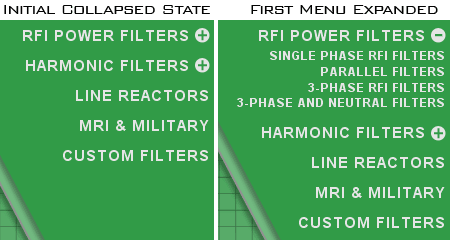
BTW, tested in IE7, IE8 and FF3.
Cheers,
-Kevin Wentworth

Tags for Jquery Accordion Menu - Expanding UL Menu
Jquery | Example | Web Design | Css
Comments for this Posting
No comments. Be the first to post a reply.
Sorry, comments are closed for this posting.
Please Email Kevin if you have any questions. Thanks!
