
Recent Posts
- (09/10) Fixing Warning: the ECDSA host key for 'github.com' differs from the key for the IP addressTAGS:Web Server Admin
- (12/26) CakePHP 3 - Getting List of Column Definitions from a Table (like schema())TAGS:CakephpCake3
- (09/14) Change Order of Loaded Behaviors in CakePHP 3TAGS:Cake3CakephpWeb ProgrammingPhp
- (05/29) CakePHP 3 - Accept JSON Header Only Working When Debug FalseTAGS:Web ProgrammingCakephpCake3
- (05/23) Remove All Events from Google Calendar (Reset Calendar)TAGS:Web ProgrammingPhp
- (11/08) Google Tag Manager (GTM) Not Firing Default PageView EventTAGS:Web ProgrammingJavascriptGoogle Tag Manager
- (10/13) In PHP, how do you get __toString() Magic Method Result without calling echo?TAGS:CakephpCake3Cakephp 13PhpWeb Programming
- (11/14) Getting output from shell_exec() at all timesTAGS:Web ProgrammingWeb Server Admin
Subscribe to my feed
MainelyDesign.com Blog
Fixing the Default HP OfficeJet Scanner Settings (which suck)
Posted on 05/28/2009 at 11:11 pm by Kevin Wentworth
Viewed 12,883 times | 0 comments
The default settings for my OfficeJet L7500 All-In-One Scanner suck! I thought the scanner was junk. Every photo I scanned, espcially glossy finished photos, were coming out looking like they were from a 1960s era camera: over-exposed and super high contrast. Not good! I thought I had good Photoshop skills, but even they were no match for the over-exposed mess that HP was sending into Photoshop.
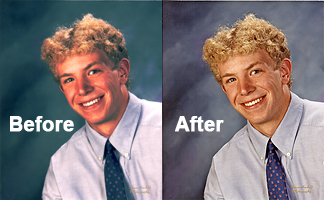
How did I improve the quality? Easy (usabilty rant- they should be the default settings, or at least changeable from a button in the main user interface screen)
- When you are in the scan dialogue window (If using Photoshop, after you've selected File > Import > OfficeJet Pro L7500 Twain) choose Scan > Scan Preferences
- Uncheck the setting for Automatically Adjust Exposure
- Click the button for Quality vs. Speed
- Check the box for scan at a higher bit depth
- That's it... now you can make all your adjustments in Photoshop. Nevermind HP's crappy built-in functions.
And yes, that is a photo of me from Senior Year in high school, circa 1998. Go Trojans!
Cheers,
-Kevin Wentworth

Tags for Fixing the Default HP OfficeJet Scanner Settings (which suck)
Gear | Usage | Graphic Design | Software | Usability | Photoshop
Comments for this Posting
No comments. Be the first to post a reply.
Sorry, comments are closed for this posting.
Please Email Kevin if you have any questions. Thanks!
